Windows and Linux on the same laptop : what if dual booting was no longer an option ?





Two operating systems, two partitions, one choice at startup. In the 2010s, dual boot was a ray of hope for developers who needed Linux for their development tools, but also Windows for Microsoft Office, corporate email or certain business applications.
It offered a simple answer to the developer’s problem: run Windows and Linux side by side on the same PC and pick whichever environment best suited the task at hand. No more need for several PCs.
Then the landscape changed. With the rise of local virtualization, the arrival of more advanced compartmentalization solutions and stricter regulatory requirements, dual boot no longer seems like the obvious choice. So the question deserves to be asked: does it still have a place in 2026?
Today, we put dual boot on trial against the new requirements for security, isolation and productivity. Will the defendant please rise.
Why dual boot held out for so long
If dual boot has survived until 2026, it is because for a long time it met a need to access environments and tools that were sometimes hard to virtualize or unavailable on certain operating systems. By hosting several environments on the same PC, it combined software compatibility, native performance thanks to direct hardware access, and cost control.
At startup, the user chooses which environment to launch, whether Windows or Linux. Only one system runs at a time, and it then has all of the machine’s resources at its disposal, from the GPU to specific USB devices and industrial interfaces.
Each system has its own applications, settings and data. To launch a Windows tool, test a Linux driver or access a specific technical environment, dual boot looks like a simple, proven solution with no infrastructure to deploy.
The defense will argue that dual boot helps streamline the IT fleet by avoiding a proliferation of physical workstations. But on the stand, its operational cost for developers and IT teams alike is a serious aggravating circumstance.
The limits of dual boot for users and IT teams
For users, it means lost time and broken focus. Only one environment can be used at a time, and every switch requires a full reboot. On paper, we are talking about just a few lost minutes. In reality, it means interrupting your work: you have to close your applications, lose your working context and wait for everything to restart.
Dreaming of reading documentation in Windows while debugging in Linux? Forget it. You will have to finish all your tasks in the first environment and reboot the PC to carry on in the other one.
For IT teams, dual boot makes workstation management more complicated. Each operating system has to be deployed, maintained and updated separately. In practice, this means security policies, monitoring tools and support mechanisms have to cover two environments (or more, in the case of multi-booting) that are never active at the same time. The IT security team will be thrilled…
And one can even break the other: in August 2024, a Windows security update left Linux unable to boot on many dual-boot machines, a problem that was only fully fixed in May 2025.
Does dual boot meet security requirements for sensitive environments?
Not really. Both systems share the same UEFI firmware and the same boot chain, and each has direct, privileged access to them. So compromising the less protected of the two is enough to expose the common foundation, and with it the entire workstation. Secure Boot ensures that the boot process has not been tampered with, but it does not stop a compromised system, once running, from going after its neighbor. Clearly, the IT department will not be pleased to hear that.
What’s more, one system can read the other’s data if it is not encrypted. And security tools, starting with EDR, are often designed for the primary system, leaving the second partly outside their monitoring. Data sharing between the two systems, for its part, often relies on shared partitions, with no mechanism controlling what passes from one system to the other.
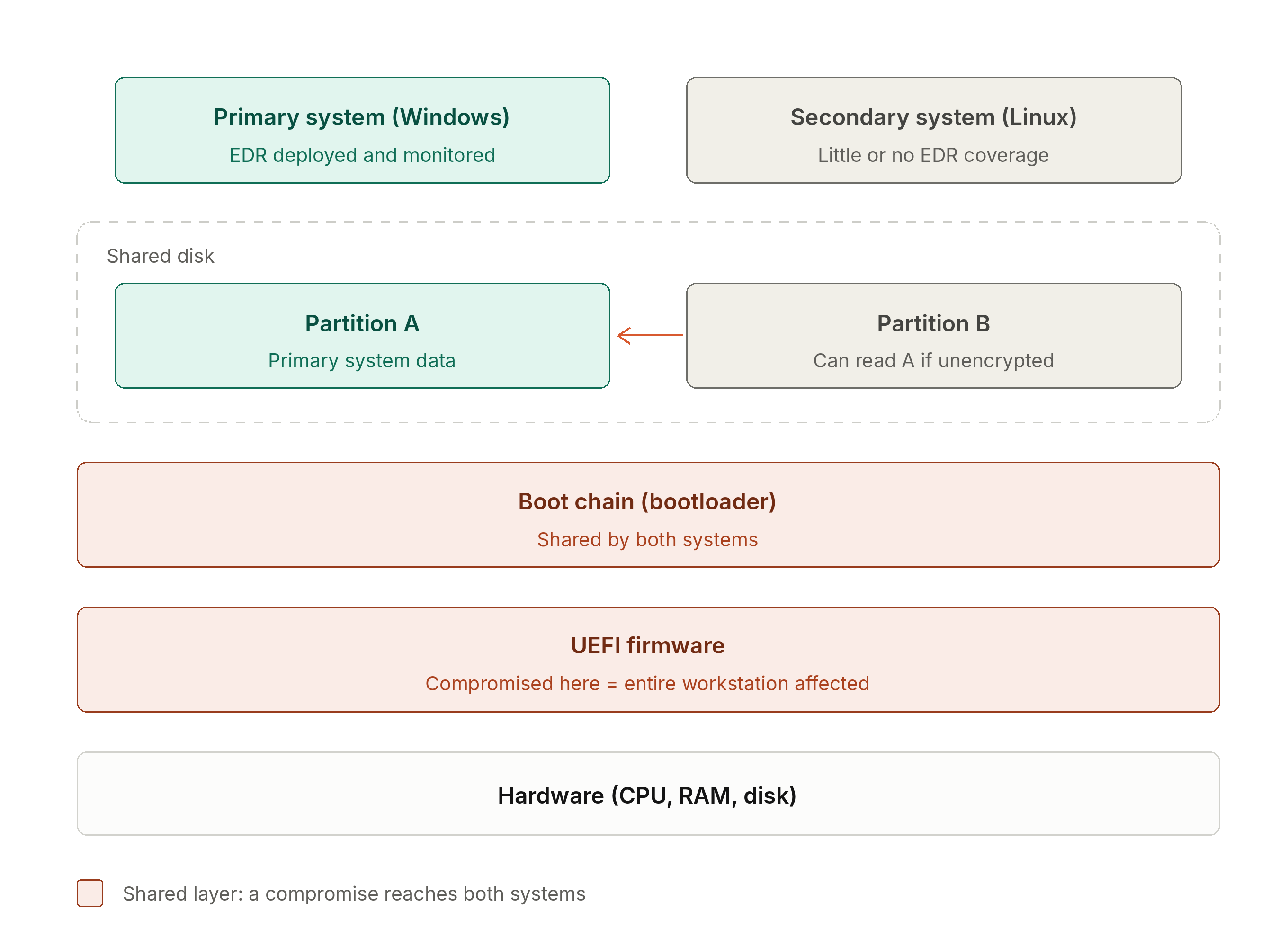
Dual boot long met compatibility and performance needs, but it quickly becomes complex to secure, administer and maintain in a professional setting.
What alternatives offer isolation without multiplying PCs?
For developers, Dev Containers and WSL have been game-changers. They provide access to much of the Linux ecosystem without leaving Windows and have already replaced dual boot for many uses. While they do not cover every use case and can still have some limitations in terms of hardware access or performance, their primary goal remains productivity, not strict isolation.
VDI infrastructures follow a different logic. By moving workstations to the cloud or the data center, they simplify administration and reduce data exposure, at the cost of a new dependency, this time on the network connection.
Ultimately, all these approaches are trying to solve the same equation: combining performance, ease of use and isolation. Yet until recently, improving one of these parameters almost always meant degrading the other two.
The multi-environment workstation: a way out?
The multi-environment workstation sets out to solve this impossible equation. In a guide published earlier this year, ANSSI, France’s national cybersecurity agency, describes the concept and its principles in detail.
Like dual boot, the goal is to run several working environments side by side on the same machine. But where dual boot separates them without truly isolating them, the multi-environment workstation relies on an architecture designed to isolate each environment.
It all comes down to architecture. Whereas traditional VMs, such as VirtualBox, run on top of a host operating system, the multi-environment workstation relies on a minimal foundation and a Type 1 hypervisor installed directly on the hardware, whose role is to isolate the environments from one another. Each one runs in its own virtual machine, and none controls the others. This foundation addresses the weaknesses of dual boot one by one.
The boot chain is protected, including against an attacker with elevated privileges. Each environment has its own encrypted virtual disk and never sees anyone else’s.
Combining isolation, performance and ease of use
For developers, no more reboots. The different contexts remain available at all times. Developers can code in Linux, test in Windows and validate compatibility with business tools, all without rebooting. On the same workstation, an Internet-connected Windows office environment and a Linux development environment run side by side, without sharing the same level of trust.
Beyond developers, this approach lets the IT department control IT fleet costs (fewer PCs per user), helps the CISO meet isolation requirements, and can also make day-to-day life simpler for admins.
The ANSSI guide goes even further by requiring protection against attacks that exploit the processor’s internal workings. An attack launched from one environment must affect neither the foundation nor the other environments.
Each peripheral remains assigned to a specific environment, and all data is encrypted, whatever the use.
Conclusion: switching, the new deciding factor
For a long time, alternatives to physical isolation forced a choice between security, performance and ease of use.
Kerys’s multi-environment workstation changes the game. Isolation is built into the very design of the workstation, while switching between environments becomes instantaneous.
The question is therefore no longer just how to run several operating systems side by side, but how to let users move from one to another without friction. That is precisely the challenge Kerys designed YS::Desktop to meet, following the recommendations of the ANSSI guide. Its approach: give each environment its own dedicated memory and processor cores, for isolation guaranteed by design, without sacrificing performance.
Ready to turn the page on dual boot? Discover what a multi-environment workstation can change in your day-to-day work.
You might also be interested







Ready to isolate
Without Compromise?
Live walkthrough by specialists who've solved this for teams like yours.