.svg)



.svg)


Active Directory Tiering: Securing Tiers Without Multiplying PCs




It's known for its airtight logic, its deceptively tricky simplicity, and its notoriously painful implementation: the privileged account tiering model is now the de facto standard for any organization running Active Directory (AD, to its friends). Tiering is, in a way, putting an old saying into practice: good fences make good neighbours.
A compromised T0 account should never be reachable from a T2 workstation. And since physical separation has reigned supreme in information security for decades, the concept of the Privileged Access Workstation (PAW) grew directly out of tiering. The idea is simple: one dedicated, isolated workstation per privilege level.
The technical mechanics of tiering (GPOs, organizational units, account separation) are already well covered by specialized Active Directory resources. What's covered a lot less is what happens once this rule meets a real IT fleet, a real budget, and a very real team. Real life, basically. That operational friction is exactly what this article digs into.
Grab your favorite hot drink, let's get into it!
The Overlooked Challenge of Tiering
Tiering classifies assets and accounts by sensitivity level, and forbids an account at one level from authenticating to an asset at a lower trust level.
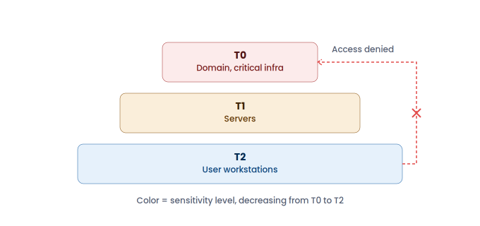
Tiering system: T0 for domain and critical infrastructure admin, T1 for servers, T2 for user workstations
The PAW extends that principle down to the workstation itself. A workstation holds credentials and session traces in memory, so it needs to belong to a single tier or it becomes the weak link that lets an attacker climb from one level to the next. On paper, the rule fits in one sentence. On the ground, it turns into a logistical headache.
One PAW Per Tier: A Rule That's Hard to Implement
At Dodulard, a heavyweight of the deli meats industry, one administrator handles domain controllers, application servers, and user support every single day. Three tiers, so three workstations to juggle all day long — an arrangement just as uncomfortable for him as for the CIO applying the rule across the whole team. And since there are eight of them, that's a minimum of twenty-four workstations to buy, configure, patch, and replace. Beyond the hit to the IT budget, it's also a heavy maintenance burden. You can imagine how thrilled the CFO and CISO are about that.
It's a bit like a company deciding to separate its departments by putting each one in its own building, with its own entrance. Few organizations actually do that. It's far more practical to assign each department a floor and secure access within a single building, with different badges and doors that simply won't open to the wrong level. The PAW, as it's typically implemented, amounts to building one building per department.
The security rule is sound; the implementation it's usually given isn't necessarily.
The Cost of a Dedicated Workstation Per Privilege Level
Sound as the rule may be on paper, two limitations emerge once it's put into practice: its cost, and the fact that it rests on a classification that never moves once it's set.
The cost isn't limited to the hardware's purchase price. Every additional workstation repeats the same overhead, tier after tier: an OS license, an endpoint security agent, a slot in the patch management cycle, a docking station, secure storage space, and one more line item in onboarding and offboarding procedures.
Technical support faces the same multiplication: a support ticket or a firmware update becomes an operation to repeat across two or three machines for the same person. Across a fleet of a few dozen administrators, this management overhead often ends up outweighing the initial hardware purchase over time — something many CISOs only discover once they sit down to budget the project, after the tiering model has already been signed off on paper.
Tiering Versus the Shifting Nature of Risk
Tiering assigns a risk level at a single point in time: T2 for a user workstation, T1 for a server, for example. But real-world risk keeps evolving. The developer workstation is a perfect illustration of this limitation. Usually classified as T2, it nonetheless often holds cloud access tokens, secrets, API keys, or even access to CI/CD pipelines. Compromising those assets can have consequences comparable to a T0 or T1 workstation, despite a T2 label.
The rise of AI agents in development environments widens that gap even further. These tools no longer just suggest code — they read files, execute commands, and call APIs, inheriting the privileges of the developer's session as they do. As a result, a single tier can mask radically different exposure levels depending on the data, identities, and tools actually present on the workstation.
Hardware-Level Logical Separation: The End of the Dilemma?
For a long time, virtualization was associated with Type 2 hypervisors (VMware, Citrix, and the like). Today, the Type 1 hypervisor is enjoying renewed interest.
Running directly on the hardware, with no intermediate OS in the way, it can run several environments in parallel on a single physical workstation. Each environment is isolated from the others at the hardware level, rather than being stacked on top of one another. That's exactly what a subsidiary of a large construction group implemented. Their development team had been given Windows workstations with administrator rights to make their work easier.
This setup clashed with the Group's security policy and considerably increased the risk.
Rolling out multi-environment workstations, aligned with ANSSI's guidelines, let every developer run two separate, fully secured environments side by side on a single PC: a Group Master environment and a dedicated Linux environment for development.
The same principle, applied to the admin workstation discussed earlier, keeps T0, T1, and T2 properly separated on a single PC. To return to the building analogy: instead of constructing one building per department, you secure the floors of a single building, with access paths that never cross.
Worth clarifying: this approach isolates and separates environments on a single workstation. It does not provide centralized monitoring of usage or security events across those environments — that role still belongs to the detection and logging tools already in place within the organization.
What Does This Actually Change for a System Administrator?
For an administrator, a multi-environment workstation means keeping a single physical machine and switching to whichever environment matches the tier they need to work in. Each environment has its own credentials, resources, and security policies, with nothing shared between them. This approach can offer a sound response to NIS2 or SecNumCloud requirements, without multiplying PCs.
Operationally, the IT team now manages a single physical PAW per user: one serial number, one firmware, one refresh cycle — while still maintaining as many isolated environments as tiering requires. Hardware management overhead becomes proportional to the number of users rather than the number of tiers covered.
Logical separation doesn't replace tiering best practices, but it does solve the hardware constraint. Organizational units, GPOs, tier-dedicated accounts, and privileged access management (PAM) solutions all remain essential. Logical separation simply operates at a different level: that of the physical workstation on which those rights are exercised. The two approaches are complementary; neither substitutes for the other.
Conclusion
The question tiering has ever really raised was never whether the model makes sense. Spoiler alert: it does. The real question has always been where its true cost ends up once you step outside the theoretical model: in the number of workstations to manage, or in the time spent properly defining what each environment needs to isolate. In most deployments today, that cost lands on hardware. Yet that's not a requirement of the tiering model itself — it's simply a consequence of how it's been chosen to be applied.
At Kerys Software, we believe the answer lies in a different approach to the workstation itself: running several fully partitioned environments, each dedicated to a distinct use case, on a single piece of equipment. We help organizations keep the benefits of tiering while significantly cutting its operational and hardware complexity. Don't want to multiply your PCs? Get in touch.
You might also be interested






Ready to isolate
Without Compromise?
Live walkthrough by specialists who've solved this for teams like yours.
.svg)