Two virtualization models.
Only one works when the network doesn’t.
One laptop. Several environments. No datacenter to feed.
VDI made a promise a decade ago: keep data safe by keeping it far away, locked in a server room and streamed back to users as pixels. The catch? Your people are now only as productive as their connection, and you’re now running a datacenter just so they can open a desktop.
YS::Desktop flips the model. It turns a single laptop into several, completely separate, secure
workspaces (corporate, dev, admin, internet, OT,...) that live on the same workstation but can’t
reach into one another. No servers to buy, no gateway to babysit, no permanent link to keep alive.
Security is now built into the machine your people already carry.

VDI puts your desktop somewhere else.
We give you back full control.
VDI
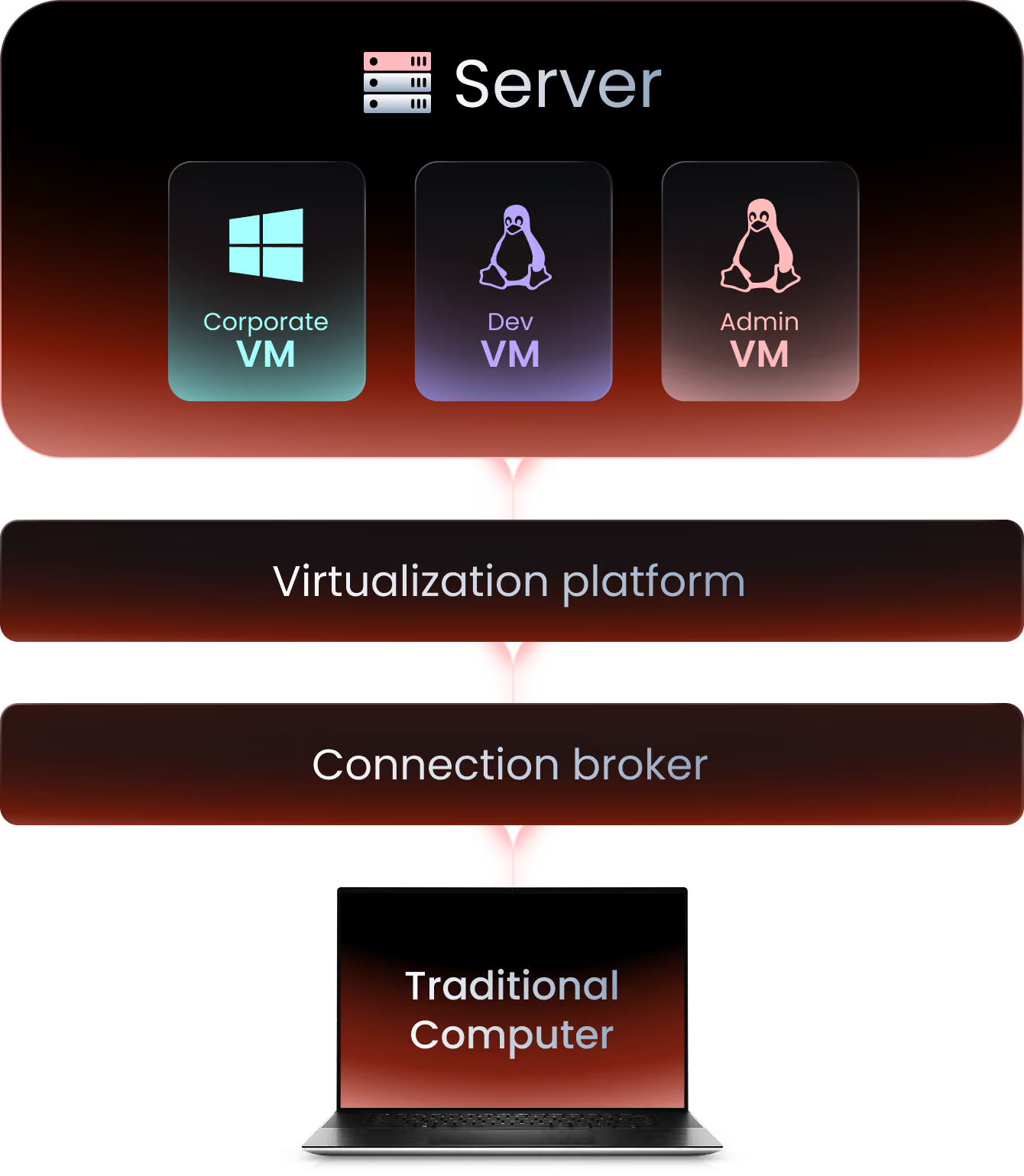
Hardware
YS::Desktop
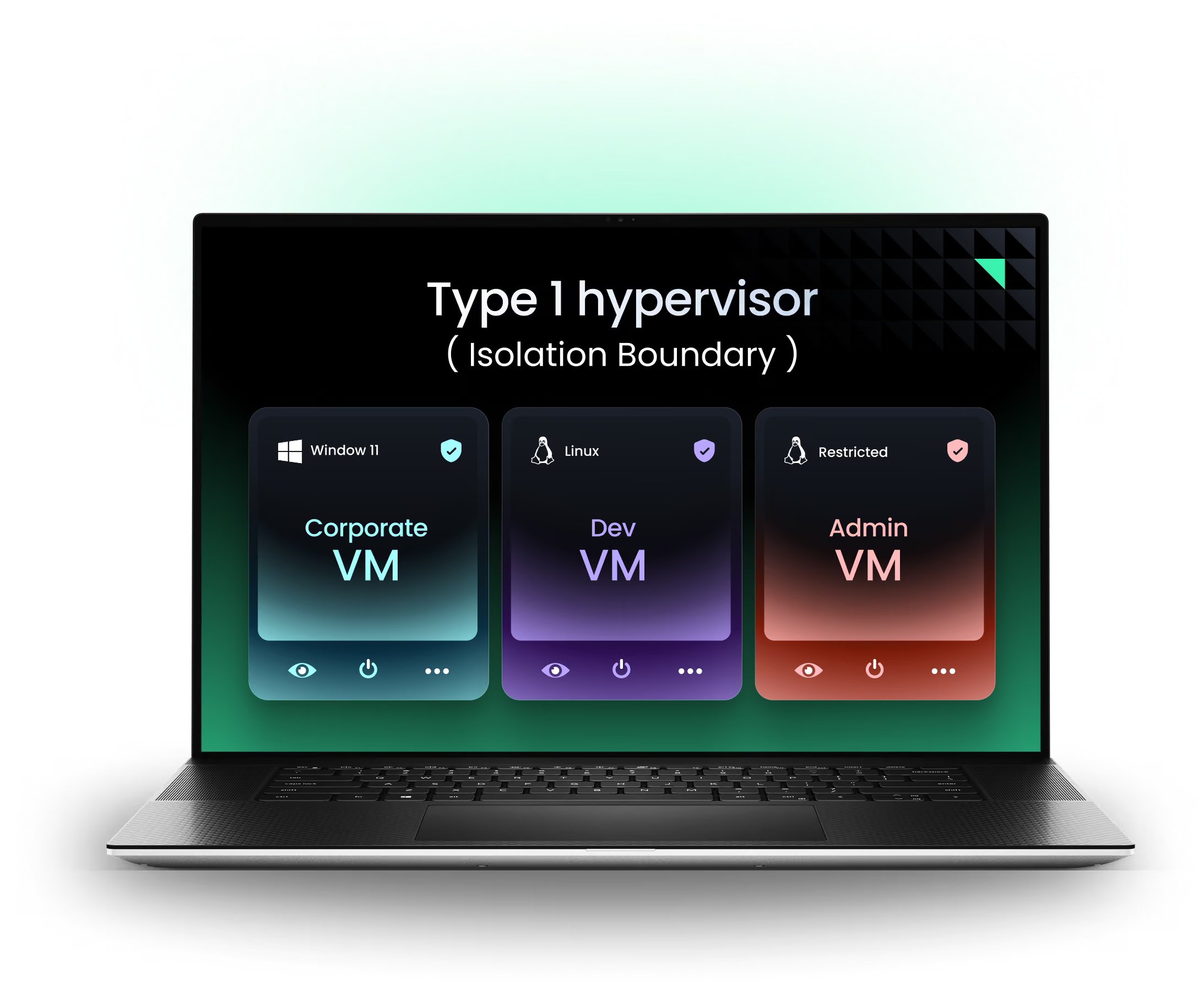
Hardware

YS::Desktop VS VDI
Comparative | YS::Desktop | VDI |
|---|---|---|
 In one word | Runs multiple fully isolated environments on one workstation. Each with its own OS kernel. Works offline. | Hosts desktops in a remote data center. Streams pixels only, session lost without network. |
 Isolation model (security) | > Full isolation (air gap) between environments > Only the hypervisor controls the hardware | > Isolation happens between VMs on the server, not on the endpoint > If the endpoint is compromised, the data isn’t protected and the server doesn’t even know |
 Compliance to regulations and good practices | > NIS2 for all entities > ANSSI’s guide for secure administration > ANSSI’s guide for multi-environment workstation > Restricted environments | Falls short on most regulations due to the lack of granular access control, auditability, and protocol-level isolation |
 Performance | > Dynamic allocation of resources > Direct hardware passthrough for consuming needs | > Bound to network latency and bandwidth > Degrades on poor connections, unusable offline |
 Compatibility | > Compatible with everything a standard workstation supports > Runs Windows and Linux guest environments | > Theoretically client-agnostic > Needs a broker (Citrix, Horizon, AVD) to access Windows and Linux environments |
 Deployment and administration | > On-site deployment > Need to reinstall the workstations > Easy admin with central console | > Requires data center or cloud infrastructure > Heavy upfront and recurring hosting costs > Easy admin with central console |
 Recommended for… | > Admin workstations > OT operations of all kinds > NIS2 essential and important entities > Restricted environments > Developers > Pentesters > Consultants > M&A > BYOD | > Low-power office apps > Remote/offshore staff > BYOD |
Where YS::Desktop wins, and what you gain
OT & Field Operations
Industrial sites rarely have the rock-solid connection VDI demands, and often shouldn’t be exposed to the outside at all. YS::Desktop works completely offline, giving an engineer a locked-down OT workspace and a separate internet/IT workspace on the very same laptop, with no bridge between them. Your teams stay productive anywhere, and you open no new door into critical systems.
Admin workstation (PAW)
The people with the keys to your most sensitive systems deserve a clean, protected place to work; without carrying a second laptop or leaning on a jump server that attackers target most. Worse, if that datacenter goes down, admins lose the very tools they need to fix it. YS::Desktop gives them a dedicated, admin workspace right alongside their everyday one, so privileged credentials are never exposed to email or the web. One device, full separation, less to manage.
Developers
Developers are the users who suffer most from a remote desktop: every millisecond of lag hits their work, their build, their debugger. VDI removes exactly the local power developers need. Add the pain of peripherals, GPU acceleration and nested environments, and you end up handing them a second physical laptop anyway. Or, you can give them local admin on the corporate machine and lose control. YS::Desktop offers a secure, open dev workspace right next to a tightened corporate one, so that developers get the environment they love while you regain control of the corporate master.
Restricted environments (IGI 1300)
The real challenge lies in ensuring separation between the different sensitivity levels. ANSSI’s recommendations on sensitive and restricted architectures acknowledge the workstation as a valid place to consolidate multiple environments. With YS::Desktop, each one runs fully isolated on a single physical machine, the separation is enforced locally by the hypervisor itself, not by a network connection to a remote broker or server that could fail. Each environment also acts as a single, physical, inventoriable device across its entire lifecycle, which keeps the accountability trail simple by design.
NIS2 Entities
NIS2 asks you to segment, control access, and prove it. Most architectures answer that at the network core (VLANs, firewalls, network zones). YS::Desktop brings that same segmentation down to the device itself: each environment isolated on the machine, VPN routing enforced rather than left to the user, security policies that shift with context, and an activity trail that can’t be altered after the fact. Compliance you can demonstrate in every environment, on one laptop.
What buyers ask when comparing
YS::Desktop and VDI




Ready to isolate
Without Compromise?
Live walkthrough by specialists who've solved this for teams like yours.